Install and first run
Platforms
Section titled “Platforms”CardAdvantage runs on Android, Windows, and Linux.
Download cardadvantage-linux-x64.tar.gz
(64-bit x86). It needs glibc 2.39 or newer, e.g. Ubuntu 24.04, Fedora 40, or Debian 13; it
does not start on Ubuntu 22.04. The archive has no
top-level folder, so unpack it into one of its own and run card_advantage from there:
mkdir -p ~/cardadvantage && cd ~/cardadvantagetar -xzf ~/Downloads/cardadvantage-linux-x64.tar.gz./card_advantageEach release on the releases page
also carries a SHA256SUMS file. With both files in one folder, sha256sum -c SHA256SUMS
checks the download.
The file dialogs used for backups and CSV imports need xdg-user-dirs and
xdg-desktop-portal-gtk installed.
Android and Windows
Section titled “Android and Windows”Android will be on Google Play and Windows on the Microsoft Store. Neither listing is live yet. This page will link them when they are.
The first launch
Section titled “The first launch”There is nothing to sign up for. It opens straight to your cards, with four sections along the navigation bar: Cards, Decks, AI Architect, and Settings.
Everything you add is stored on your device. Nothing is uploaded to us. See the Privacy Policy for exactly what does leave the device.
Sync the card catalog
Section titled “Sync the card catalog”Before you rely on the app offline, download the card catalog:
- Open Settings.
- Tap Sync Card Catalog.
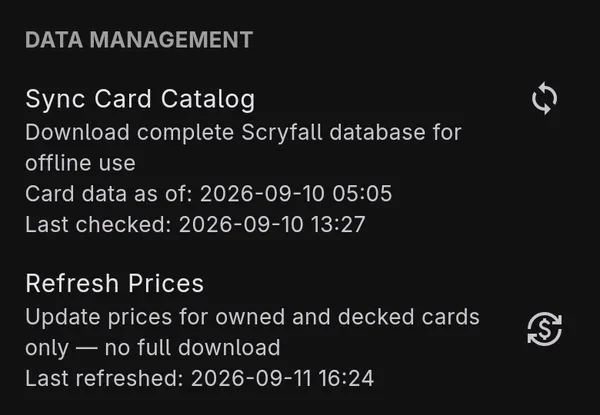
This downloads the complete Scryfall card database to your device, so searching and deck building keep working without a connection. It is a large download and takes a while, so run it on a stable connection. The tile shows the date of the card data you have and when the app last checked for a newer one. Tapping it again when you are current does nothing beyond the check.
Refresh Prices, just below, updates prices for the cards in your collection and decks only, without downloading the whole catalog again.
- To use AI deck building, the app downloads an AI model the first time you use it. Read The AI model download before you start on a metered connection: it is several gigabytes.
- Read Backup, restore, and deleting your data once your collection is worth keeping.