The AI model download
AI deck building runs on Google’s Gemma model, on your own device. Before the first build the app has to download it, and it is a large file.
What gets downloaded
Section titled “What gets downloaded”| Platform | File | Size |
|---|---|---|
| Windows, Linux | gemma-4-E2B-it-Q4_K_M.gguf (run with llama.cpp) |
about 3.1 GB |
| Android | gemma-4-E2B-it.litertlm (run with LiteRT-LM) |
about 2.6 GB |
Both come from Hugging Face. Hugging Face sees the download request and your IP address, as the Privacy Policy describes. Nothing about your collection is sent with it.
Make sure the device has room for the file plus some headroom, and use Wi-Fi rather than mobile data if your plan is metered.
When it downloads
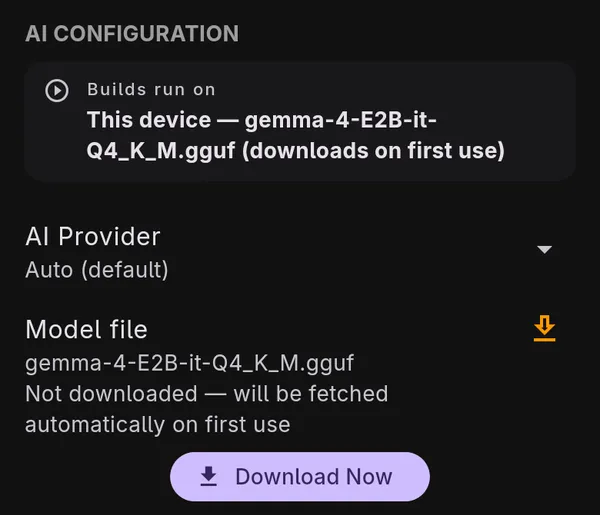
Section titled “When it downloads”The app fetches the model automatically the first time you use an AI feature. To get it over with ahead of time:
- Open Settings and find AI Configuration.
- The Model file row shows the file name and whether it is downloaded.
- Tap Download Now. A progress bar shows how far along it is.
If the download stalls or fails
Section titled “If the download stalls or fails”Networks drop, and a 3 GB file is a long download. The app keeps the partial file and picks up where it stopped, so a failed download is not wasted:
- Check the connection, and check the device has room for the whole file.
- Go back to Settings → AI Configuration and tap Download Now again. It resumes from the bytes it already has.
Advanced settings
Section titled “Advanced settings”Under Model file there is an Advanced section. Most people never need it.
- Model URL changes where the model is downloaded from, for example a mirror you trust.
It has to be the same kind of file the platform uses: a
.ggufon desktop, a.litertlmon Android. - GPU Backend (desktop) chooses how llama.cpp runs the model: Auto, which is the default, or a specific one of CPU, Vulkan, CUDA, Metal, OpenCL, HIP, or BLAS. If AI features fail on your machine, try CPU; it is slower but works on any hardware.
Semantic search (optional)
Section titled “Semantic search (optional)”Searching cards by meaning (“cards that punish opponents for drawing”) uses a second, smaller model, EmbeddingGemma, about 280 MB.
- Open Settings and find Semantic Search.
- Tap Embedding Model (EmbeddingGemma) to download it.
- Run Sync Card Catalog afterwards. The search index is built from the catalog during the sync.
Removing the models
Section titled “Removing the models”The models sit in the app’s own storage. Delete All App Data deliberately keeps them, since they contain nothing about you and are slow to download again. Uninstalling the app removes them. See Backup, restore, and deleting your data.